
[SATV 0x02] The LLVM Framework
01 Overview of LLVM
LLVM (Low Level Virtual Machine) is a modular and reusable compiler framework supporting multiple front-ends and back-ends.
1.1 Architecture of LLVM
The job of a compiler is to convert human-friendly source code (C++, C, Java, etc.) into machine-friendly binary code (x86, ARM, etc.). It typically consists of three parts—frontend, optimizer, and backend.
The frontend includes a preprocessor, parser, and IR generator. Take C++ as an example: the preprocessor expands #includes and #defines; the parser checks for syntax errors and builds an Abstract Syntax Tree (AST); the IR generator converts the AST into an Intermediate Representation (IR).
The optimizer transforms a program into an equivalent one that is more efficient, which is the focus of this course.
The backend includes a compiler backend, assembler and linker. Still take C++ for example, its compiler backend converts the IR into target-specific assembly code; its assembler converts the target-specific assembly code into target-specific machine code; its linker combines multiple machine code files into a single image (e.g. executable).
The front-ends are language-specific, i.e., they target a specific programming language, such as C++ and Clang, Go and Gollvm, Rust and Rustc, etc. The back-ends are architecture-specific, meaning that they convert assembly code into machine code for the target architecture (x86, ARM, etc.).
1.2 LLVM Passes
The LLVM Optimizer (opt) is a series of “passes” that run one after another.
The Clang frontend, for instance, accepts a C++ source file and produces an LLVM IR. The LLVM IR is then passed to the LLVM Optimizer, which generates another LLVM IR. This iterative process (each iteration is called a “pass”) continues until the IR is accepted by the backend.
There are two kinds of passes – analysis and transformation:
- Analysis pass analyzes LLVM IR to check program properties
- Transformation pass transforms LLVM IR to monitor or optimize the program
Note that analysis passes do not change code; transformation passes do.
LLVM is typically extended by implementing new passes that look at and change the LLVM IR as it flows through the compilation process.
1.3 Why LLVM IR?
We introduced the concept of LLVM Intermediate Representation (LLVM IR) above. But why do we need LLVM IR? Wouldn’t it be more convenient for LLVM optimizers to process the source code directly? Here are four primary reasons:
- Easy to translate from the level above
- Easy to translate to the level below
- Narrow interface (simpler phases/optimizations)
- The IR language is independent of the source and target languages in order to maximize the compiler’s ability to support multiple source and target languages
Example: The source language might have “while”, “for” and “foreach” loops, while the IR language might have only “while” loops and sequence. Therefore, the translation must eliminate “for” and “foreach”.
Assume that we need to handle an AST ((1+X4)+(3+(X1*5))), whose expression may be:
Add(Add(Const 1, Var X4, Add(Const 3, Mul(Var X1, Const 5))))With the help of IR language, instead of handling the complex expression shown above, we just need to execute:
tmp0 = 1 + X4
tmp1 = X1 * 5
tmp2 = 3 + tmp1
tmp3 = tmp0 + tmp2
Obviously, the translation can make the order of evaluation explicit, name the intermediate values and the introduced temporaries are never modified.
Now, try generating LLVM IR yourself. The following shows how to generate LLVM IR using clang:
clang test.c -S -emit-llvm -o <file>02 Structure of LLVM IR
There are 3 formats of LLVM IR:
- In-memory: binary in-memory format, used during compilation process
- Bitcode: binary on-disk format, suitable for fast loading (obtained by
clang -emit-llvm -c test.c -o xxx.bc) - Assembly: human-readable format (obtained by
clang -emit-llvm -S -c test.c -o xxx.ll)
2.1 Program Structure in LLVM IR
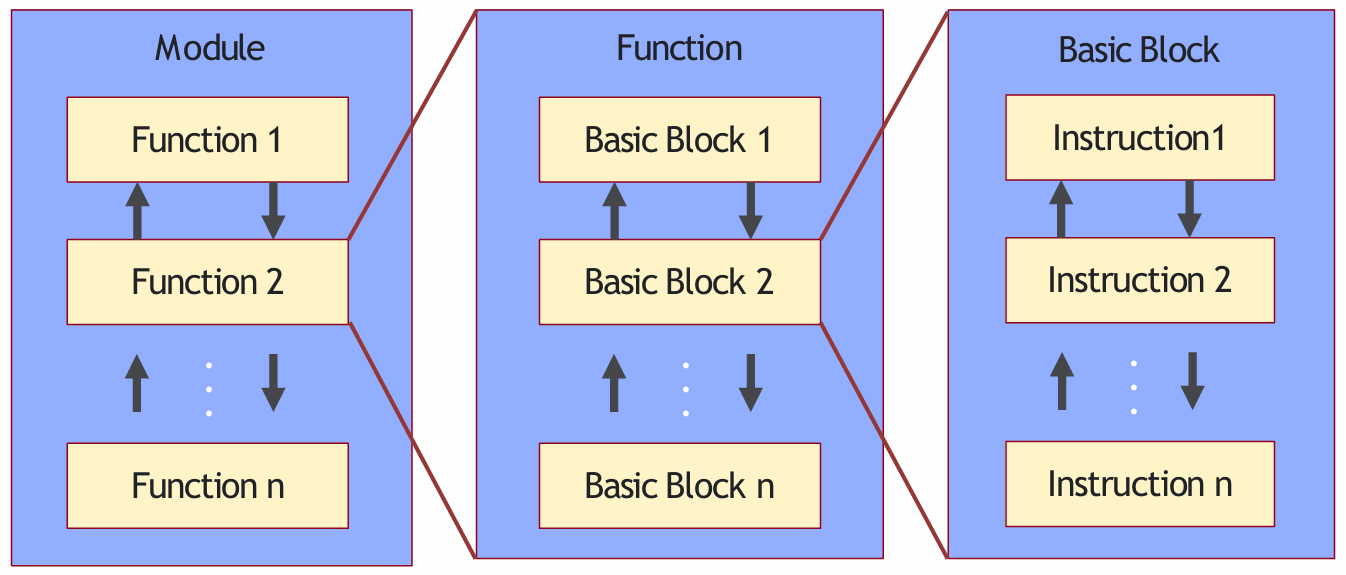
The program structure in LLVM IR:
- Module is a top-level container of LLVM IR, corresponding to each translation unit of the front-end compiler.
- Function is a function in a programming language, including a function signature and several basic blocks. The first basic block in a function is called an entry basic block.
- Basic Block is a set of instructions that are executed sequentially, with only one entry and one exit, and non-head and tail instructions will not jump to other instructions in the order they are executed.
- Instruction is the smallest executable unit in LLVM IR; each instruction occupies a single line.
2.2 Variables and Types
Two kinds of variables: local and global:
%indicates local variables. e.g.%1 = add nsw i32 %a, %tmp@indicates global variables. e.g.@g = global i32 20, align 4
Two kinds of types: primitive (e.g. integer, floating-point) and derived (e.g. pointer, struct).
Integer type is used to specify an integer of desired bit width:
i1: A single-bit integeri32: A 32-bit integer
Pointer type is used to specify memory locations:
i32**: A pointer to a pointer to an integeri32 (i32*)*: A pointer to a function that takes as argument a pointer to an integer, and returns an integer as result
2.3 The SSA Form
The Static Single Assignment (SSA) form requires that every variable be assigned only once, but may be used multiple times.
SSA was proposed in 1988 and an efficient algorithm was developed in IBM, which is still in use in many compilers.
See the C code below:
int square(int x) {
    x = x * x;
    return x;
}
Its SSA form may be like:
int square(x_1) {
	x_2 := x_1 * x_1;
	return x_2;
}
SSA is commonly used in compilers because it simplifies and improves a variety of compiler optimizations.
LLVM IR makes use of the SSA form:
define i32 @sqaure(i32) local_unnamed_addr #0 {
	%2 = mul nsw i32 %0, %0
	ret i32 %2
}
2.4 Phi Node
A problem arises with SSA when the same variable is modified in multiple branches. See the following C code:
x = 0;
if (y < 1) {
    x++;
} else {
    x--;
}
return x;
And its SSA form be like:
x_1 := 0;
if (y_1 < 1) {
	x_2 := x_1 + 1;
} else {
	x_3 := x_1 - 1;
}
x_4 := phi(x_2, x_3);
return x_4;
In this example, to return the variable x, the SSA form has two choices — x_2 and x_3, depending on the path taken.
A Phi node abstracts away this complexity by defining a new variable x_4 which is assigned the value of x_2 or x_3.
2.5 Example
The image below shows a C program and its LLVM IR counterpart.
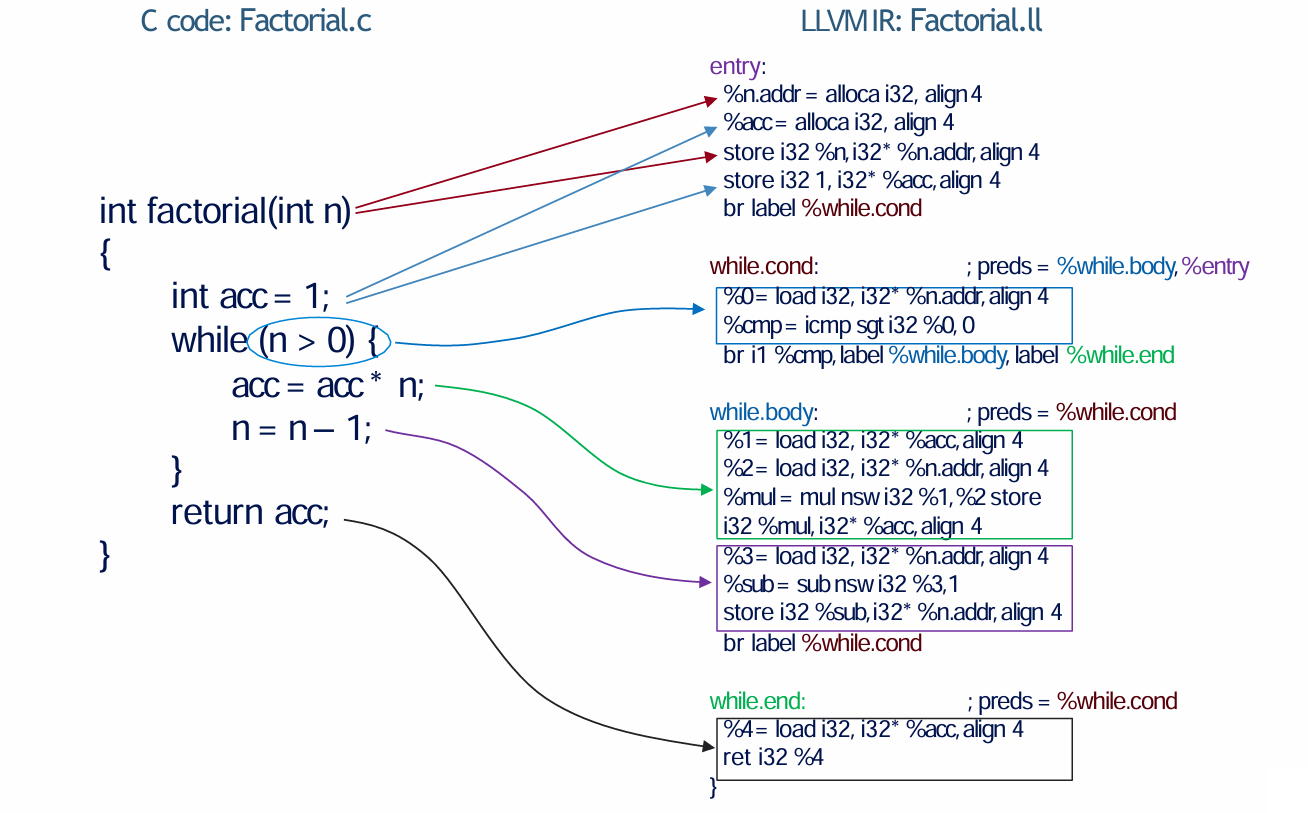
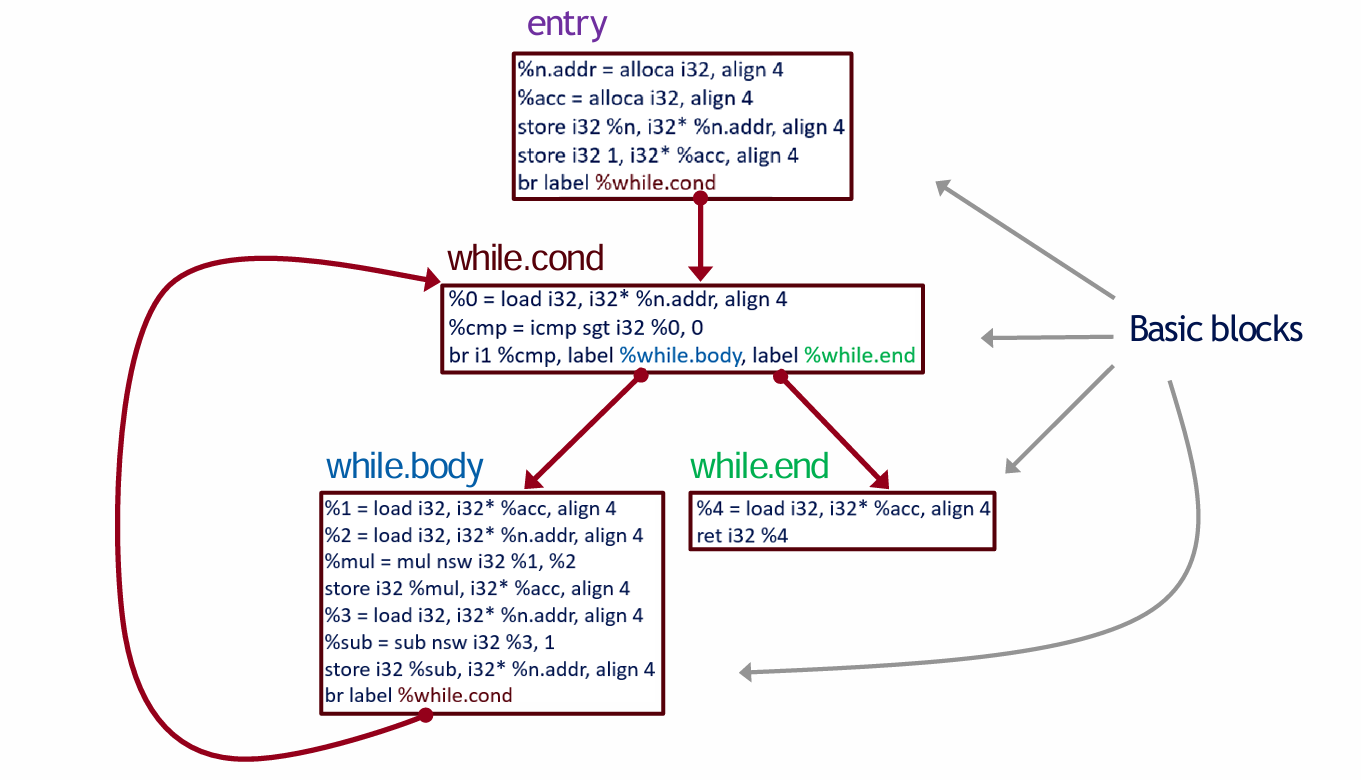
The function factorial in the C source code is split into four basic blocks — entry, while.cond, while.body and while.end in LLVM IR.
To better observe the workflow between the four basic blocks, we can draw a Control Flow Graph (CFG).
2.6 LLVM Class Hierarchy
LLVM classes are part of the LLVM IR and are used to represent different elements of the code during the compilation process.
The graph below shows the hierarchy of a part of the LLVM classes.
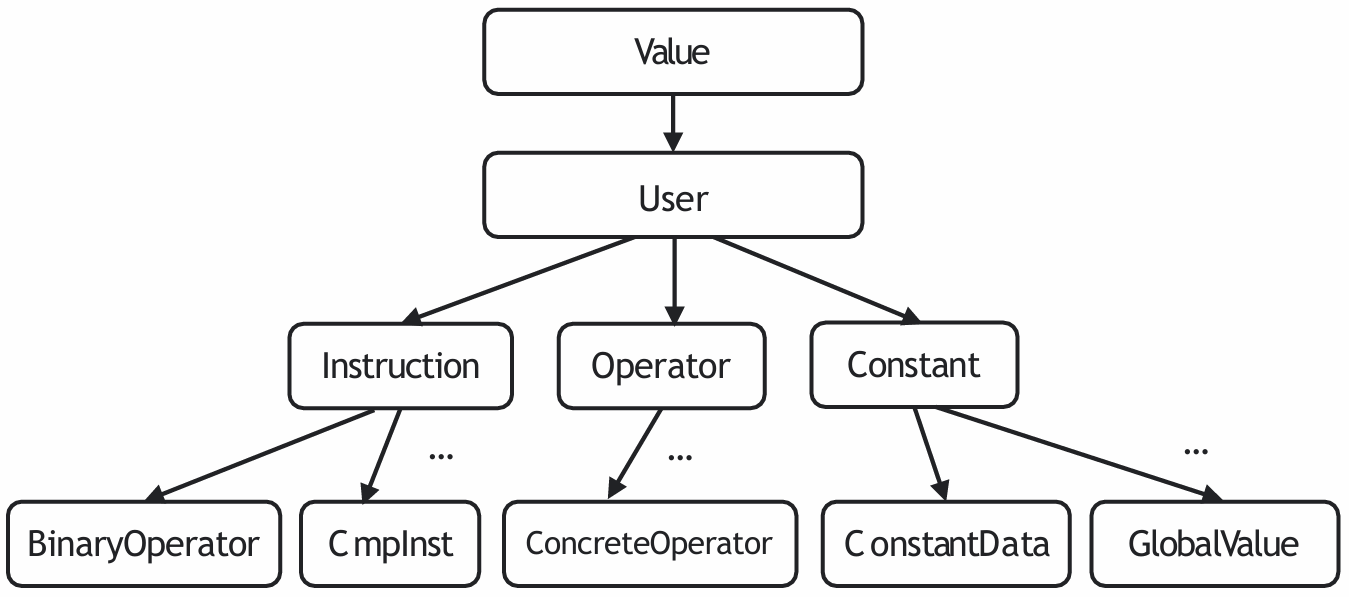
Here I briefly introduce the definitions of some classes:
Valueis the base class for all LLVM IR objects that have a type. It represents any value in the LLVM IR, such as constants, variables, or the result of an instruction.Useris a base class for all LLVM IR objects that hold a list ofOperands. An operand is essentially anotherValuethat theUserdepends on.Instructionrepresents a single operation in the LLVM IR, such as arithmetic operations, memory access, or control flow instructions.
For more classes, you can visit this page.
2.7 Instructions and Variables
Since LLVM IR uses the SSA form, there is always a unique instruction assigning a value to each variable. Thus, each instruction can be viewed as the name of the assigned variable. For example:
%0 = load i32, i32* %x, align 4
%1 = load i32, i32* %y, align 4
%add = add nsw i32 %0, %1
Let the instruction in line 3 be . Then represents the instruction that assigns to it, i.e. %0 = load i32, i32* %x, align 4, instead of the operand variable %0.
llvm::outs() << *I.getOperand(0);
// will not output: %0
// will output: %0 = load i32, i32* %x, align 4
The following examples show how to print information using outs() and errs().
// Example 1 - printing a function name (Function *F)
outs() << F->getName() << "\n";
// Example 2 - printing a instruction name (Instruction *I)
I->dump() or outs() << *I << "\n";
// Example 3 - printing a basic block (BasicBlock *BB)
BB->dump() or outs() << *BB << "\n";
2.8 Instructions
2.8.1 AllocaInst
alloca is an instruction to allocate memory on the stack.
2.8.2 StoreInst
store is an instruction for storing to memory.
The instruction above stores value v of type T into location pointed to by register %y.
2.8.3 LoadInst
load is an instruction for reading from memory.
The above instruction loads value of type T into register %x from location pointed to by register %y.
2.8.4 BinaryOperatorInst
Binary operators are instructions for binary operations, such as add, sub, mul, udiv, sdiv.
Difference between
udivandsdiv:
The
udivinstruction returns the unsigned integer quotient of its two operands.The
sdivinstruction returns the signed integer quotient of its two operands.Usage of
nsw: thenswkeyword is used to ensure that the result of an arithmetic operation is defined in terms of signed integer overflow behavior.
2.8.5 ReturnInst
ret is an instruction that returns a value (possibly void), from a function.
2.8.6 CmpInst
This instruction returns a bool value or a vector of bool values based on comparison of its two integer, integer vector, or pointer operands.
icmp eq: Compare %x and %y, and set %cmp to 1 if %x is equal to %y, and to 0 otherwise.
Wherein, eq is a condition. The following table shows all possible conditions.
| <cond> | expansion |
|---|---|
eq | equal |
ne | not equal |
ugt | unsigned greater than |
uge | unsigned greater or equal |
ult | unsigned less than |
ule | unsigned less or equal |
sgt | signed greater than |
sge | signed greater or equal |
slt | signed less than |
sle | signed less or equal |
2.8.7 BranchInst
Conditional branch instruction.
C:
if (a == 0) {
    return 0;
} else {
    return 1;
}
LLVM IR:
%cmp = icmp eq i32 %a, 0
br i1 %cmp, label %ifEqual, label %ifUnequal
ifEqual:
	ret i32 0
ifUnequal:
	ret i32 1
2.8.8 PHINode
The phi instruction is used to implement the phi node in the SSA form.
C:
int x = 0;
if (y < 0) {
    x++;
} else {
    x--;
}
return x;
LLVM IR:
br i1 %cmp, label %then, label %else
then:
	%inc = add nsw i32 0, 1
	br label %end
else:
	%dec = add nsw i32 0, -1
	br label %end
end:
	%x = phi i32 [%inc, %then], [%dec, %else]
	ret i32 %x
Explanation: phi assigns to %x the value of:
%incif predecessor basic block is%then%decif predecessor basic block is%else
2.9 Checking Instruction Type
A dynamic cast converts an instruction to a more specific type in its class hierarchy at runtime:
auto *AI = dyn_cast<CastInst>(Instruction)AI: Pointer that points to the target type instructionCastInst: Target type instructionInstruction: Instruction you want to cast
If target type is not in original instruction’s class hierarchy, AI will point to NULL. This property can be used to check if an instruction is of a particular type:
if (LoadInst *LI = dyn_cast<LoadInst>(I)) {
	// if I can be converted to LoadInst, do something
}
2.10 Write Your Own LLVM Pass!
An LLVM pass is created by extending a subclass of the Pass class. We illustrate this for a function pass:
#include "llvm/Pass.h"
#include "llvm/IR/Function.h"
using namespace llvm;
class MyAnalysis: public FunctionPass {
	static char ID;
	MyAnalysis() : FunctionPass(ID) { }
	bool runOnFunction(Function &F);
}
char MyAnalysis::ID = 1;
bool MyAnalysis::runOnFunction(Function &F) {
	// Your function analysis goes here
	return false;
}
static RegisterPass<MyAnalysis> X(
	"MyAnalysis", "MyAnalysis", false, false
);IDis the identifier of the pass class and must be explicitly defined outside the class definition.runOnFunctionwill be called for each function in the module. It must returntrueif it modifies the LLVM IR, andfalseotherwise.- The
RegisterPassclass is used to register the pass. The template argument is the name of the pass class and the constructor takes 4 arguments: the name of the command line argument, the name of the pass, a bool if it modifies the CFG, and a bool if it is an analysis pass.
Upon compiling using cmake, a shared static library file “MyAnalysis.so” will be created. To invoke this pass, run the following command:
opt -load MyAnalysis.so -MyAnalysis factorial.llFind more details at Writing an LLVM Pass (legacy PM version) — LLVM 21.0.0git documentation, Writing an LLVM Pass — LLVM 21.0.0git documentation.
03 The LLVM API
3.1 Module Class
Class llvm::Module
constStringRef getName() const: Get a short “name” for the module, useful for debugging or logging.constiterator_range functions(): Get an iterator over functions in the module.
3.2 Function Class
Class llvm::Function
unsigned getInstructionCount() const: Return the number of non-debug IR instructions in this function.
3.3 Instruction Class
Class llvm::Instruction
unsigned getOpcode() const: Return a member of one of the enums, e.g.Instruction::Add.constbool isBinaryOp() const: Check if the instruction is a binary instruction.
3.4 User Class
Class llvm::User
Value* llvm::User::getOperand(unsigned i) const: Return the operand of this instruction, 0 for first operand, 1 for second operand.
Too much to list… See the slide for more details.
04 Navigating the Documentation
In this section, we will introduce some helpful documentation for building your own LLVM.
The links in this section may yield inaccurate information for uncommon APIs, since they point to the latest LLVM version whereas we use LLVM 8. The LLVM version changes often due to frequent releases; so a naive web search could also produce inaccurate information.
You can find all the information you need to know at LLVM Programmer’s Manual. A simple and basic way to find what functions you want: highlight some of the important classes and interfaces available in the LLVM source-base.
LLVM Doxygen provides a very detailed and comprehensive guide to LLVM classes and functions. Make good use of the inheritance graph, APIs, source code, and the “references”/“referenced by” sections it offers.
Further reading: