
[SATV 0x01] Introduction: Program Analysis
01 What Is Program Analysis
Program analysis aims to discover useful facts about programs. You may already know some manual or automated testing tools, such as:
- Manual testing or semi-automated testing: JUnit, Selenium, etc.
- Manual “analysis” of programs: Code inspection, debugging, etc.
The focus of this course is automated program analysis.
Program analysis can be broadly classified into three kinds:
-
Static (compile-time)
- Infer facts by inspecting source or binary code
- Typically:
- Consider all inputs
- Overapproximate possible behavior
- E.g. compilers, lint-like tools
-
Dynamic (execution-time)
- Infer facts by monitoring program executions
- Typically:
- Consider current input
- Underapproximate possible behavior
- E.g. automated testing tools, profilers
-
Hybrid (combining dynamic and static)
02 Terminology
The following is a snippet of JavaScript code.
var r = Math.random();	//value in [0,1)
var out = "yes";
if(r < 0.5)
	out = "no";
if(r == 1)
	out = "maybe";
console.log(out);
Q: What are the possible outputs?
2.1 Overapproximation vs. Underapproximation
Judging from the code alone, it may seem that there are three possible outputs: “yes”, “no”, or “maybe”. (Overapproximation)
If we consider only a single execution (e.g., r=0.7), the output is “yes”. (Underapproximation)
However, both responses are erroneous. The first option yields the implausible output “maybe”, while the second excludes the feasible output “no”. These erroneous responses serve as quintessential illustrations of over- and under-approximation, respectively.
- Overapproximation: Consider all paths
- Underapproximation: Execute the program once
2.2 Soundness & Completeness
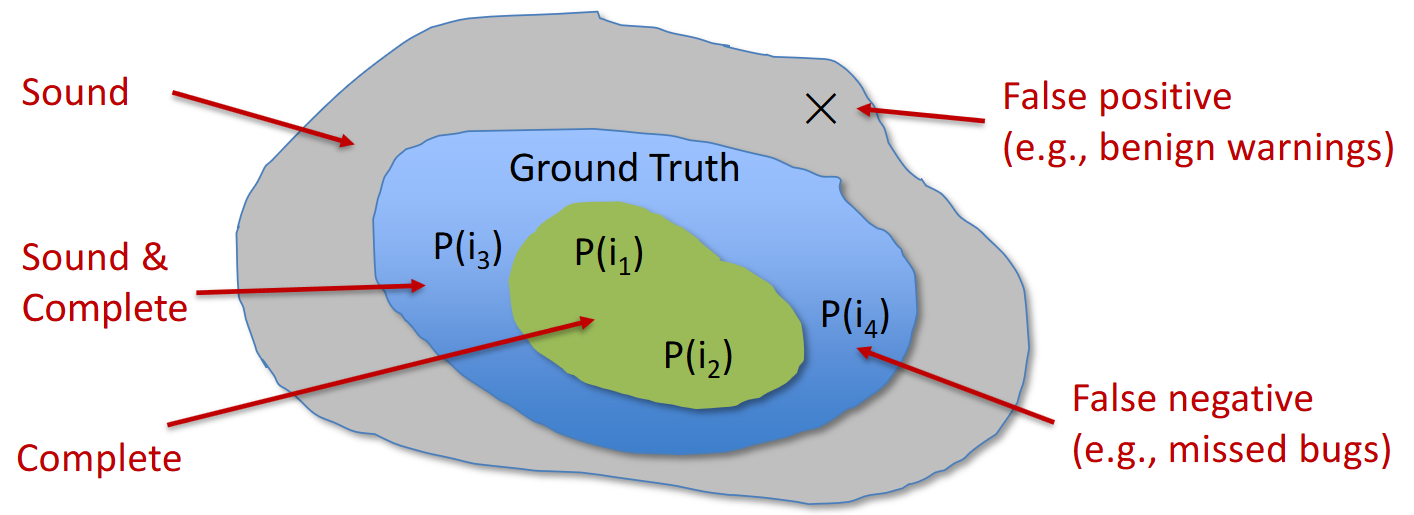
It is easy for humans to give the correct answer—“yes” or “no”. We consider this answer both sound and complete.
“Soundness” means it includes all possible outputs we want (but it might include false positives).
“Completeness” means it excludes all impossible outputs we do not want (but it might exclude some desired outputs, i.e., false negatives).
When we put these two ideas together, we get a definition that includes exactly all possible outputs.
2.3 False Positives & False Negatives
The definitions of false positives and false negatives:
- False positives: impossible outputs that are indicated possible
- False negatives: possible outputs that are indicated impossible
Let be Program, be Input, be Behavior. The following graph shows the relations between the above ideas.
2.4 Precision & Recall
Differentiate precision and recall:
- Precision: how many retrieved items are relevant
- Recall: how many relevant items are retrieved
Take the overapproximated answer mentioned above as an example; the precision and recall are:
2.5 Program Invariants
Program invariants are logical assertions whose conditions or properties remain true throughout a program’s execution. They are key to program correctness: they help verify that the program behaves as expected and play an important role in software development.
See the below code snippet:
int p(int x) { return x * x; }
void main() {
    int z;
    if (getc() == 'a')
    	z = p(6) + 6;
    else
    	z = p(-7) - 7;
}
Q: An invariant at the end of the program is (z == c) for some constant c. What is c?
Clearly, z will be 42 regardless of the input. Therefore, (z == 42) is an invariant, while (z == 30) is not.
Using the invariant to avert disaster:
int p(int x) { return x * x; }
void main() {
    int z;
    if (getc() == 'a')
    	z = p(6) + 6;
    else
    	z = p(-7) - 7;
    if (z != 42) {
        disaster();	// disaster averted
    }
}
03 Others
3.1 Undecidability of Program Properties
- Q: Can program analysis be sound and complete? A: Not if we want it to terminate!
- Questions like “is a program point reachable on some input?” are undecidable.
- Designing a program analysis is an art—trade-offs are dictated by the consumer.
3.2 Why Take This Course?
-
Learn methods to improve software quality, reliability, security, performance, etc.
-
Become a better software developer/tester
-
Build specialized tools for software analysis, testing and verification
-
Finding Jobs & Do research
3.3 Who Needs Program Analysis?
Three primary consumers of program analysis:
- Compilers
- Software Quality Tools (Primary focus of this course)
- Integrated Development Environments (IDEs)
3.3.1 Compilers
Program analysis serves as the bridge between high-level languages and architectures.
For example, we use program analysis to generate efficient code.
Before:
int p(int x) { return x * x; }
void main(int arg) {
    int z;
    if (arg != 0)
    	z = p(6) + 6;
    else
    	z = p(-7) - 7;
    print (z);
}
After:
int p(int x) { return x * x; }
void main() {
	print (42);
}
3.3.2 Software Quality Tools
Software quality tools are tools for testing, debugging, and verification.
Software quality tools use program analysis for:
- Finding programming errors
- Proving program invariants
- Generating test cases
- Localizing causes of errors
- …
Some software quality tools:
- Static Program Analysis
- Suspicious error patterns: Lint, SpotBugs, Coverity
- Memory leak detection: Facebook Infer
- Checking API usage rules: Microsoft SLAM
- Verifying invariants: ESC/Java
- Dynamic Program Analysis
- Array bound checking: Purify
- Datarace detection: Eraser
- Memory leak detection: Valgrind
- Finding likely invariants: Daikon
3.3.3 Integrated Development Environments
Examples: Eclipse and VS Code
Use program analysis to help programmers:
- Understand programs
- Refactor programs
- Restructuring a program without changing its behavior
Useful in dealing with large, complex programs
04 Quiz
- Dynamic vs. Static Analysis:
| Dynamic | Static | |
|---|---|---|
| Cost | Proportional to program’s execution time | Proportional to program’s size |
| Effectiveness | Unsound (may miss errors) | Incomplete (may report spurious errors) |
- Unsoundness yields false negatives; incompleteness yields false positives.