[SATV 0x03] Software Specifications
In a software development team, there are usually three important roles—manager, developer, and tester. Developers are responsible for developing and delivering software increments to testers, who verify the software’s functionality. Testers, on the other hand, need to prepare robust test suites to ensure that bugs in the program are found.
To ensure that this process is carried out properly, the developer and tester need to agree on specifications in advance. Otherwise, discrepancies can arise between the software’s behavior and the expected test results, resulting in incorrect test suites. Whenever such discrepancies arise, the manager should step in and coordinate the development of appropriate specifications.
Testing checks whether program implementation agrees with program specification. Without a specification, there is nothing to test! Testing is a form of consistency checking between implementation and specification, which is a recurring theme for software quality checking approaches.
Some key observations about specifications:
- Specifications must be explicit
- Independent development and testing Developer writes implementation only and tester writes specification only for it is unlikely that both will independently make the same mistake
- Resources are finite limit how many tests are written
- Specifications evolve over time tests must be updated over time
01 Landscape of Testing
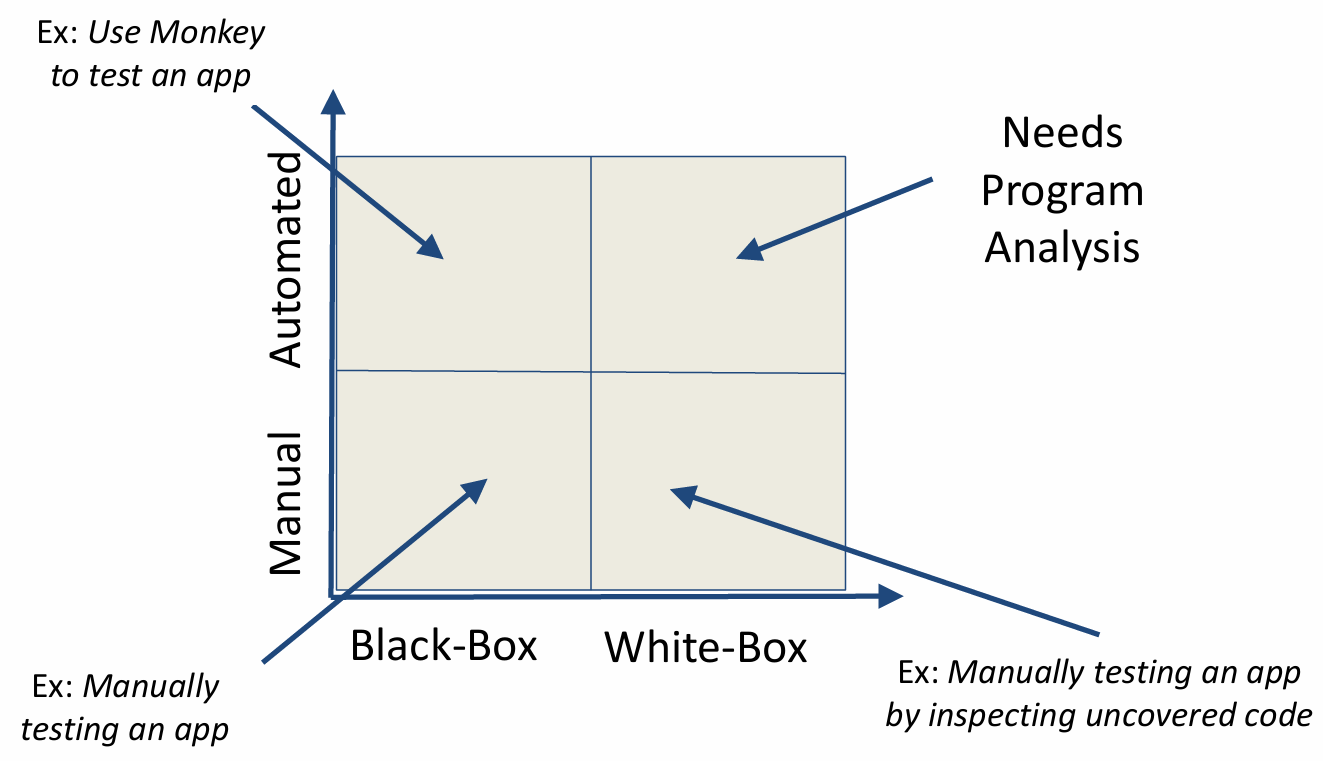
Before we talk about specifications, let’s first take a look at the Landscape of Testing. To understand how we verify software, we can map our efforts along two dimensions: the method of execution—whether Manual or Automated—and the level of internal visibility, ranging from Black-Box to White-Box approaches.
The picture below shows a basic landscape of testing. In the bottom-left, we have the most straightforward scenario: Manual Black-Box testing, which is essentially a person using an app just like an end-user would, with no knowledge of the code. If we move up to the Automated Black-Box quadrant, we use tools like a ‘Monkey’ to automatically generate random inputs and stress-test the app’s stability without needing to see what’s happening under the hood.
On the right side of the map, we dive into the code itself. Manual White-Box testing involves a developer manually interacting with the app while specifically tracking which lines of code are being executed or uncovered. Finally, the top-right quadrant represents the most advanced territory: Automated White-Box testing. Because this requires the system to automatically navigate complex internal logic, it necessitates Program Analysis to intelligently explore the code and find hidden bugs that random testing simply can’t reach.
1.1 Automated vs. Manual Testing
The most significant difference between automated and manual testing is that manual testing requires test suites to be written manually, while automated testing can run without manually-written test suites.
-
Automated Testing:
- Find bugs more quickly
- No need to write tests
- If software changes, no need to maintain tests
- Problems
- Automated testing is hard to do
- Probably impossible for entire systems
- Certainly impossible without specifications
-
Manual Testing:
- Efficient test suite
- Potentially better coverage
1.2 Black-box vs. White-box Testing
-
Black-Box Testing:
- Can work with code that cannot be modified
- Does not need to analyze or study code
- Code can be in any format (managed, binary, obfuscated)
-
White-Box Testing:
- Efficient test suite
- Potentially better coverage
1.3 Software Fault and Failure Model
We introduce the concepts of fault, error and failure by providing the following example:
public static int numZero(int[] arr) {
    // Effects: if arr is null throw NullPointerException
    // else return the number of occurrences of 0 in arr
    int count = 0;
    for (int i = 1; i < arr.length; i++) {
        if (arr[i] == 0) {
            count++;
        }
    }
    return count;
}
We can easily see that the for loop on line 5 should start at 0 instead of 1, which is an error in the program. Correspondingly, we say that int i = 1 is a fault in the program.
Now if the program takes as input the test sample [0,2,7], then we will expect the return value to be 1, but instead we will get 0. This is a failure caused by the fault.
Can any test sample trigger the failure? Not really. If we try [2,7,0], we can still get the expected return value. Here we introduce the four conditions necessary for a failure to be observed:
- Reachability: The location or locations in the program that contain the fault must be reached
- Infection: The state of the program must be incorrect
- Propagation: The infected state must cause some output or final state of the program to be incorrect
- Revealability: The tester must observe part of the incorrect portion of the program state
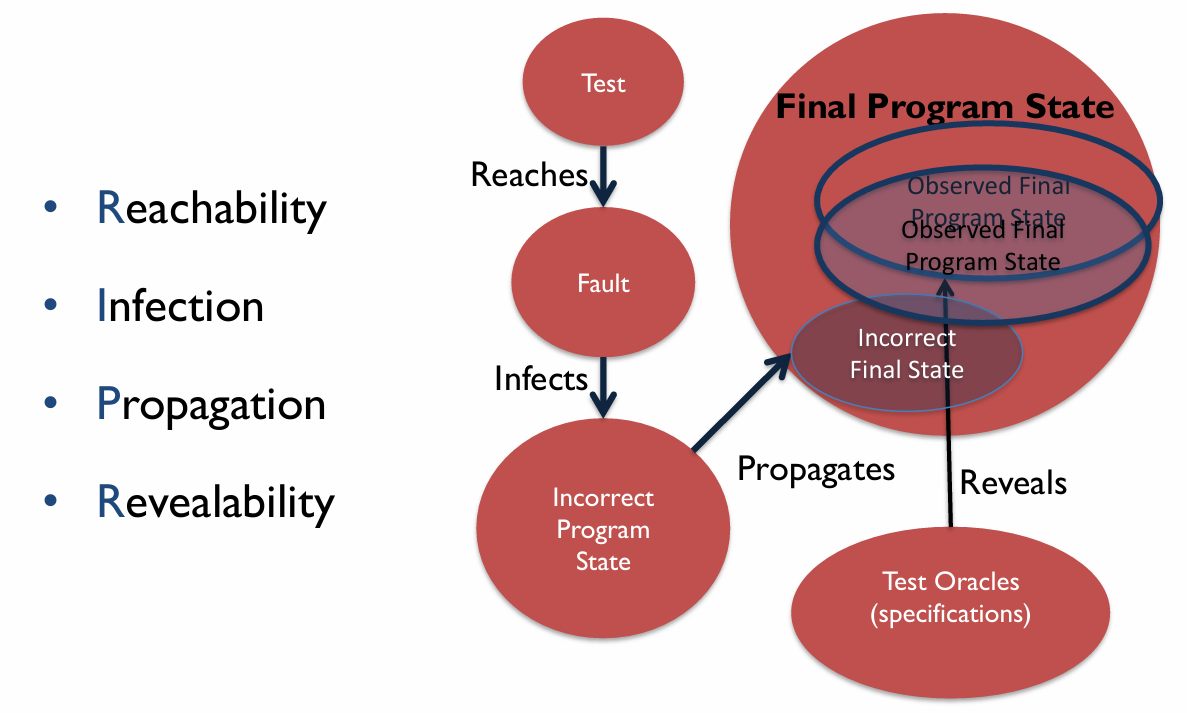
The Software Fault and Failure Model gives us a clue about how a failure is triggered and observed under these 4 conditions.
First, a test sample written by testers reaches a fault in a program, which infects the program with an incorrect program state. The program in such a state will continue to propagate an observable incorrect final state, where it yields an output to be tested. Finally, testers compare with the test oracle (specification) to decide whether a failure is observed. If , then no failure is observed, and vice versa.
The figure below illustrates the Software Fault and Failure Model:
02 Kinds of Specifications
2.1 Safety and Liveness
Safety and Liveness are 2 properties of specifications.
Safety property guarantees programs will never reach a bad state where failures may happen. Some measures to enhance safety: assertions, types, type-state properties, pre- and post-conditions, loop and class invariants.
Liveness property ensures programs will eventually reach a good state where expected behaviours will happen. Some measures to enhance liveness: program termination and starvation freedom.
2.2 Common Forms of Safety Property
This section introduces 5 common forms of safety property.
2.2.1 Types
Adding type constraints to the specification allows the implementation to be checked against them. Take the following code snippet as an example:
int x;                // Specification: x is an integer
x = read();
print("%d", x + 1);   // Implementation: x is an integer because of being added to integer
Explicit type specification is missing in dynamically-typed or untyped programming languages. A good example is JavaScript and TypeScript, where TypeScript adds static typing to JavaScript.
Java uses the Checker Framework to enhance its type system, statically eliminating entire classes of runtime errors via annotations. The following shows an example of the Nullness Checker:
public class Example {
    void sample() {
        @NonNull Object ref = null;
    }
}

// Error:
// incompatible types:
// found: @Nullable <nulltype>
// required: @NonNull Object
2.2.2 Type-state Properties
Type-state (or Temporal Safety Properties) refines types with (finite) state information, e.g. File in OPEN state, Socket in CONNECTED state, etc.
Type-state enables us to specify which operations are valid in each state and how operations affect the state; for example, fread() may only be called on a File in the OPEN state, and fclose() changes the File state from OPEN to CLOSED.
Type-state is frequently used in Locking (Mutex) and File Management as we have learned in OS, so we will skip these two examples in this document.
2.2.3 Pre- and Post- conditions
Both pre-conditions and post-conditions are predicates written in the programming language, or they can serve as a special case of an assertion. They do not need to be very precise and may cover only a subset of situations; otherwise, the effort required might become more complex than the code itself.
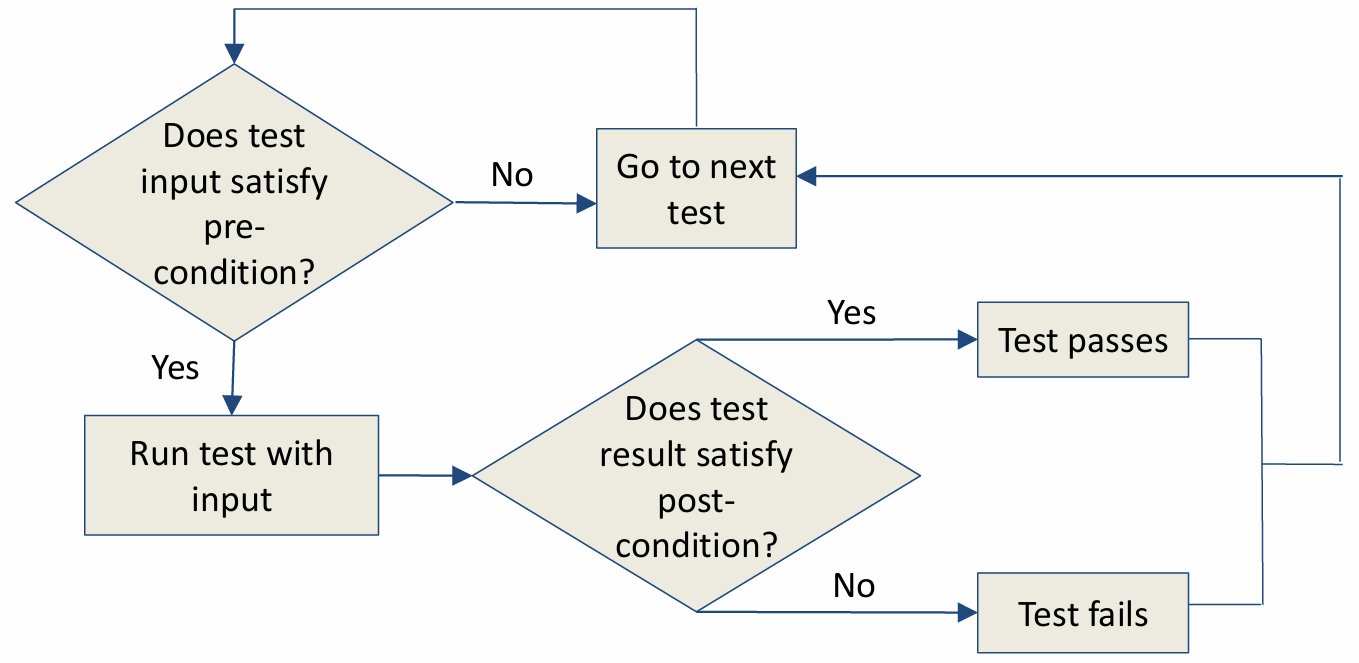
A pre-condition is assumed to hold before a function executes, and a post-condition is expected to hold after a function executes, whenever the pre-condition also holds.
e.g.
class Stack<T> {
    T[] array;
    int size;
    // pre: s.size() > 0
    T pop() { return array[--size]; }
    // post: s'.size() == s.size() - 1
    int size() { return size; }
}
The above C++ code snippet shows a basic implementation of a stack. Assuming we want to call the pop function, we need to make sure that a pre-condition (s.size() > 0) holds before we do so. If we want to check that the pop function runs normally, we can do this by checking that the post-condition (s'.size() == s.size() - 1) holds.
The process of using pre-conditions and post-conditions is shown below:
2.2.4 Invariants
In the first lecture, we have introduced the concept of program invariants. Invariants can be categorized mainly into 2 kinds:
- Loop invariants: A property of a loop that holds before (and after) each iteration captures the essence of the loop’s correctness, and by extension, the correctness of algorithms that employ loops.
- Class invariants: A property that holds for all objects of a class established upon the construction of the object and constantly maintained between calls to public methods.
e.g. Loop Invariants
procedure divide(n:int, d:int) returns(q:int, r:int)
{
	q := 0;
	r := 0;
	while(n >= d){
		q := q + 1;
		R := r - d;
	}
}
The algorithm above shows a rudimentary implementation of division and returns the quotient and remainder. Throughout the runtime of the while loop, the expression n == q * d + r consistently holds true due to the nature of division, acting as an invariant of the loop.
e.g. Class Invariants
class Rational {
    //@ invariant denom != 0;
    int num, denom;

    //@ requires d != 0;
    Rational (int n, int d){ num = n, denom = d; }

    double getDouble() { return ((double) num) / denom; }

    public static void main(String[] a) {
        int n = readlnt(), d = readlnt();
        if (d == 0) return;
        Rational r = new Rational(n, d);
        print(r.getDouble());
	}
}
In the class Rational, all methods must preserve denom != 0 and to preserve the class invariant, must check d != 0 in the constructor.
03 Measuring Test Suite Quality
There are good and bad test suites. Too few tests may miss bugs, whereas too many tests can be too costly to run, lead to redundancy, and are harder to maintain. So how do we know if our test suite is good?
Two approaches - Code Coverage and Mutation Analysis.
3.1 Code Coverage
Code coverage is a metric that quantifies the extent to which a program’s code is tested by a given test suite, expressed as a percentage of some aspect of the program executed in the tests. In practice, 100% coverage is rare (e.g., due to inaccessible code). Therefore, it is often required for safety-critical applications.
There are many types of code coverage:
- Function coverage: which functions were called?
- Statement coverage: which statements were executed?
- Branch coverage: which branches were taken?
- Others: line coverage, condition coverage, basic block coverage, data-flow coverage, prime path coverage…
quiz:
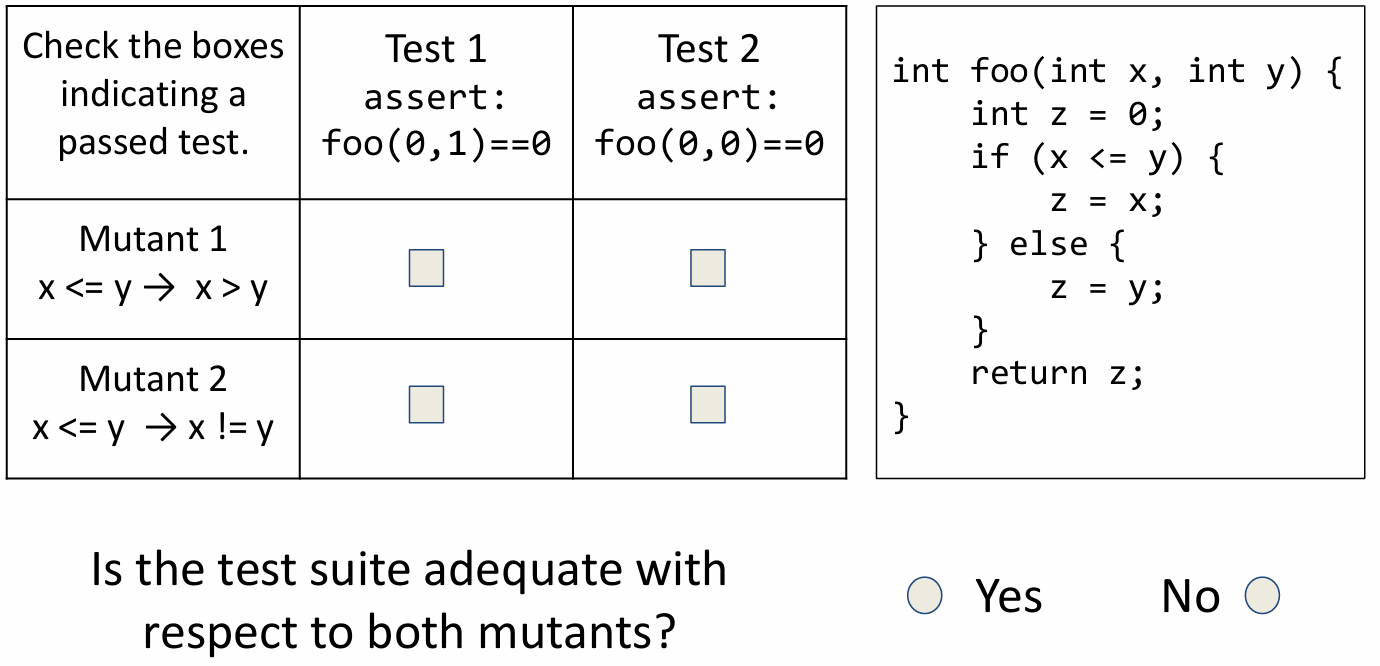
int foo(int x, int y) {
    int z = 0;
    if (x <= y) {
        z = x;
    } else {
        z = y;
    }
    return z;
}
Q: What are the statement and branch coverage when the given program takes foo(1, 0) as input (only line 2, 3, 4, 7, 8 count as valid code)?
A: Statement coverage: 80%; branch coverage: 50%.
3.2 Mutation Analysis
Mutation analysis, aka mutation testing, is founded on the competent programmer assumption - “the program is close to right to begin with”.
A variation of the program is called a mutant (e.g. replace x > 0 by x < 0). Mutation analysis’s key idea is that if a test suite is good, it should report failed tests in the mutants. So we just need to find a set of test cases to distinguish the original program from its mutants.
The process of using mutation analysis is shown below:
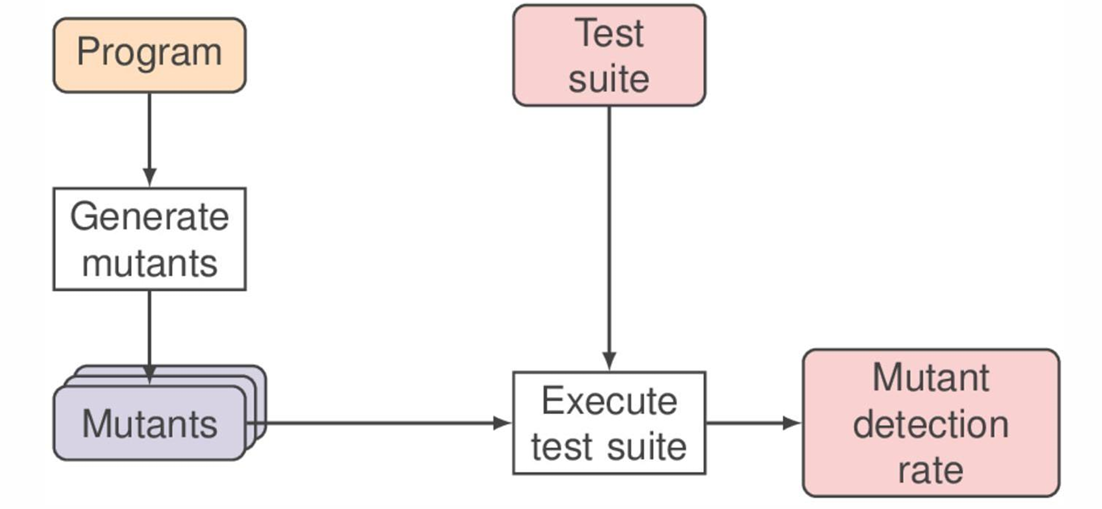
Given Program and its mutant , if , we say that is killed or detected.
Quiz:
Answer:
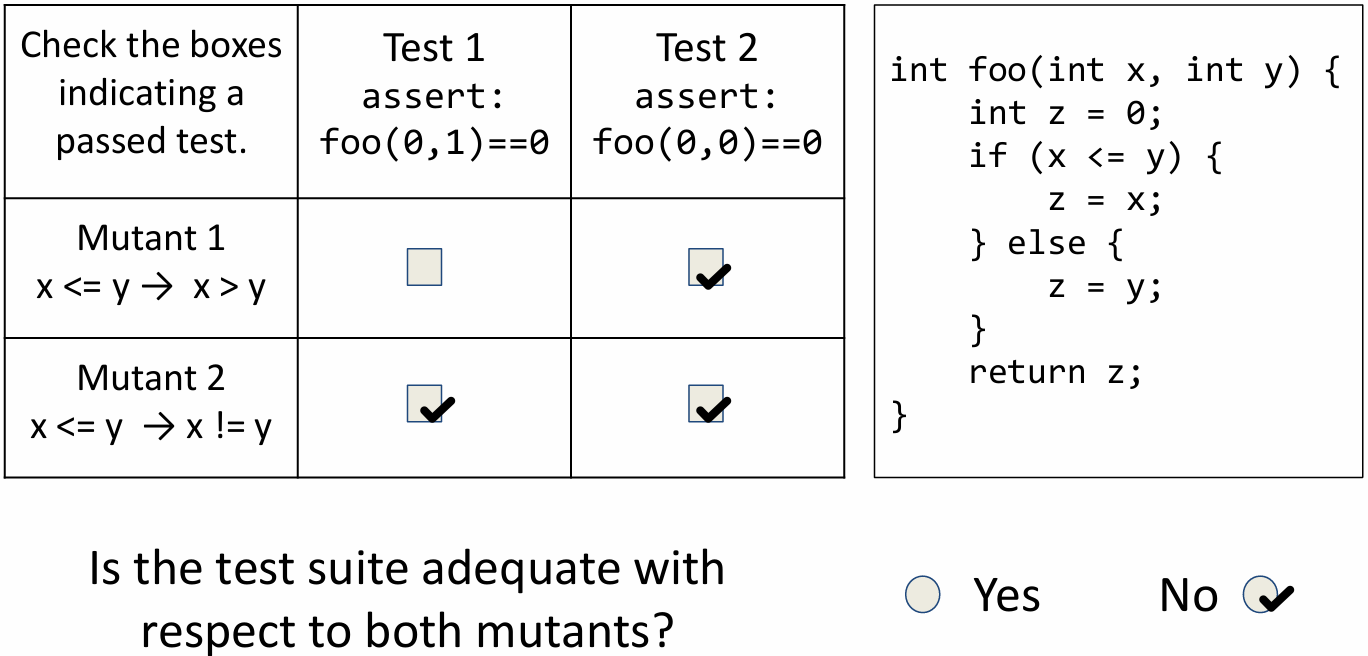
What if a mutant is equivalent to the original? Then no test will kill it.
In practice, this is a real problem. However, it can’t be easily solved. Although we can try to prove program equivalence automatically, it still often requires manual intervention.
3.3 Classification of Testing Techniques
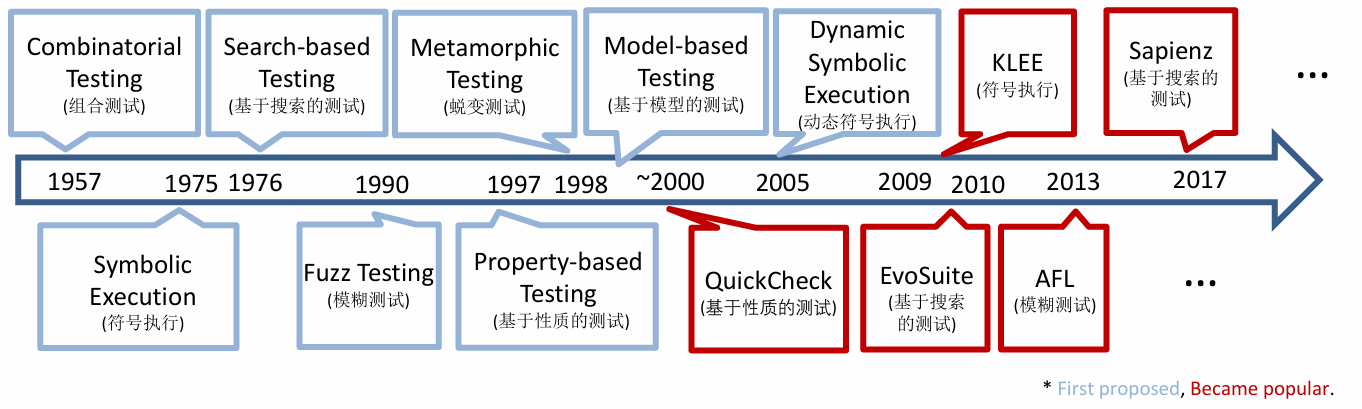
Although there are many proposals for improving software quality, the world most of the time spends only about 50% of the cost of software development on testing. The figure below shows the evolution and classification of testing techniques.